
In the field, when you’re doing groundwater detection, your gear can easily get hit by sudden rain, wet working conditions, or high humidity down in wells. These underground water detectors are packed with sensitive electronics and precision sensors. If water gets in and you don’t handle it right, the least that can happen is data drift and inaccurate readings. The worst case? Corroded circuit boards and permanent damage. Learning a solid, practical emergency procedure is a must for every field technician.

Immediate Power-Off and Initial Assessment
The very first thing to do when you find water or moisture in your detector is to cut the power—immediately. No turning it on to check if it’s still working while it’s wet, for either the main unit or the sensors. Doing that spikes the risk of short circuits big time.
| Where Water Got In | What You’ll Notice | Risk Level |
| Main unit (control console) | Garbled screen display, buttons not responding, obvious water stains around ports | High |
| Probe/electrode rods | Poor electrode contact, readings jumping all over, damaged insulation | Medium |
| Cable connectors | Oxidized ports, signal cutting in and out | Medium |
Urgent note: If the whole unit fell into water, don’t shake it to get the water out. That can actually spread the water inside and make the short-circuit problem worse.
Step-by-Step Emergency Handling by Part
1. Main Unit (Console) Water Damage
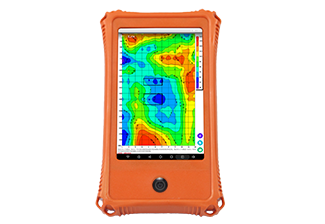 Dry the outside: Use a lint-free soft cloth or absorbent paper towel to quickly soak up water on the outside. Pay extra attention to button gaps, USB ports, charging jacks, etc.
Open it up to let moisture out (if you’re comfortable doing so): If water has already gotten inside through vents or gaps, and you have some DIY skills, you can carefully open the case (but keep in mind: opening it yourself might void your warranty, so it’s better to check with support first). Once open, use a cotton swab dipped in isopropyl alcohol to gently clean any water spots or corrosion off the circuit board. Then use a hair dryer on the cold setting (keep it about 6–8 inches away) or a shop vacuum on blow mode to dry the board.
Dry it out thoroughly: Put the main unit in a sealed bag with desiccant packs (like silica gel) and leave it for 24–48 hours. Or, place it in a constant-temperature oven set to 25–35°C (77–95°F). Do not use a heat gun on high—it can melt solder joints or damage the screen.
2. Probe and Electrode Moisture Treatment
Clean and inspect: Use a soft brush to remove any mud or debris from the probe surface. Check the O-ring seal for cracks, deformation, or if it’s missing altogether. If the seal is shot, replace it with the right size.
Dry and test: Put the probe in a dry, well-ventilated spot and let it air-dry naturally. If the electrode part is heavily oxidized, you can lightly sand the contact surface with fine sandpaper.
3. Cable and Connector Care
Get the water out: Check the cable ends for pooled water or oxidation (that greenish copper rust). If you see any, clean the pins with isopropyl alcohol.
Add waterproofing: Before reconnecting, you can put a little waterproof silicone grease on the connector to improve insulation.
Post-Treatment Verification and Testing
1. Power-on test with no load: Once everything is completely dry, turn on the main unit without any probes connected. Check if the screen looks normal and if there are any error alerts.
2. Signal test: Connect the probe and do a short-range signal test on dry ground. Compare the readings to see if they’re stable. Many detectors—like those from Guangzhou International Technology—come with a built-in self-test function. Use that to check if all channels are working properly.
Follow-Up Professional Servicing Advice
Emergency fixes only take care of the surface issues. If your device was seriously submerged, it’s a good idea to send it back to the manufacturer or an authorized repair center as soon as you can. Guangzhou International Technology Co., Ltd. has a factory in Hunan that offers professional after-sales service. They can do ultrasonic cleaning of the circuit board and in-depth diagnostics to completely remove any leftover electrolyte and prevent long-term corrosion damage.
Special reminder: Some Guangzhou International models (like the M series) support Bluetooth connection to a phone app. If water damages the Bluetooth module, it’s not something a non-professional can fix—definitely leave that to the service team.

Preventive Measures
| Preventive Action | What to Do Specifically |
| Daily checks | Inspect the O-ring before every job. Replace aging parts regularly. |
| Choose your environment | Don’t use the detector in thunderstorms or heavy rain. Avoid working in standing water. |
| Storage | Keep the unit in its original aluminum case with desiccant inside. Store it in a cool, dry place. |
| Protect the ports | When not in use, put dust caps on all connectors to keep moisture out. |
Bottom Line
Water getting into your underground water detector is not the end of the world. The key is: cut power, dry it out, and test carefully. Follow these steps, and you’ll give your device the best chance of surviving the mishap—so your Guangzhou International Technology detector can keep doing its job with accuracy and reliability on your next survey.
Contact Us – Guangzhou International Technology
📬Want to Know More About How a Particular Detector Works? Contact Us Today!
🔎More Related Articles About [Underground Water Detectors]
Which Underground Water Detectors Find Deep Water in Middle East Deserts
Why Underground Water Detectors Equipment Frequently Fails in Africa’s Hard-Rock Regions
How Did a Underground Water Detectors Locate the Main Aquifer at 450 Meters in Egypt’s Aswan Desert


